Launch a new sales agent
“I run a dental clinic and want a sales employee on WhatsApp.”
It asks about your business and prepares the employee in front of you. You review each step before it is confirmed.

Say what you want the way you would tell a colleague: “set up a new sales employee” or “fix what Aaref keeps saying”. GenuDo shows every change as a diff first, old and new side by side, and nothing touches your account until you confirm it.
Aaref only offers one slot. Make him offer the evening slots first to returning customers.
Read Aaref's current instructions
Offer a single slot for the booking.
Offer evening slots first to returning customers, then the rest.
Instead of hopping between screens and settings, you write your request to Claude or ChatGPT and it acts inside your GenuDo account. You make the call.
Describe your business in your own words and the employee is prepared in front of you: stages, instructions and the facts it answers from.
Tell it what went wrong. It reviews the conversation and proposes a clear change to the instructions. You approve or decline.
Customer data goes to your CRM, Google Sheets, Zapier, Make or n8n at exactly the right moment.
Any write to your account, like editing instructions, adding a fact or connecting another system, is shown as a diff: the old line and the new one side by side. You review it and approve, or cancel.
These are the worked examples on the MCP Server page inside the app.
“I run a dental clinic and want a sales employee on WhatsApp.”
It asks about your business and prepares the employee in front of you. You review each step before it is confirmed.
“A customer asked about prices and the agent answered wrong.”
It reviews the conversation, finds the cause and proposes a clear change to the instructions.
“Send every interested customer to Google Sheets.”
It ties the data to the right stage, so a customer is recorded the moment they are ready.
Each group holds ready-made skills. A “Write” tag means the change waits for your approval.
Plus 6 autonomous agents that run in Cowork and Claude Code: pipeline architect, pipeline doctor, automation engineer, revenue analyst, knowledge librarian and pipeline migrator.
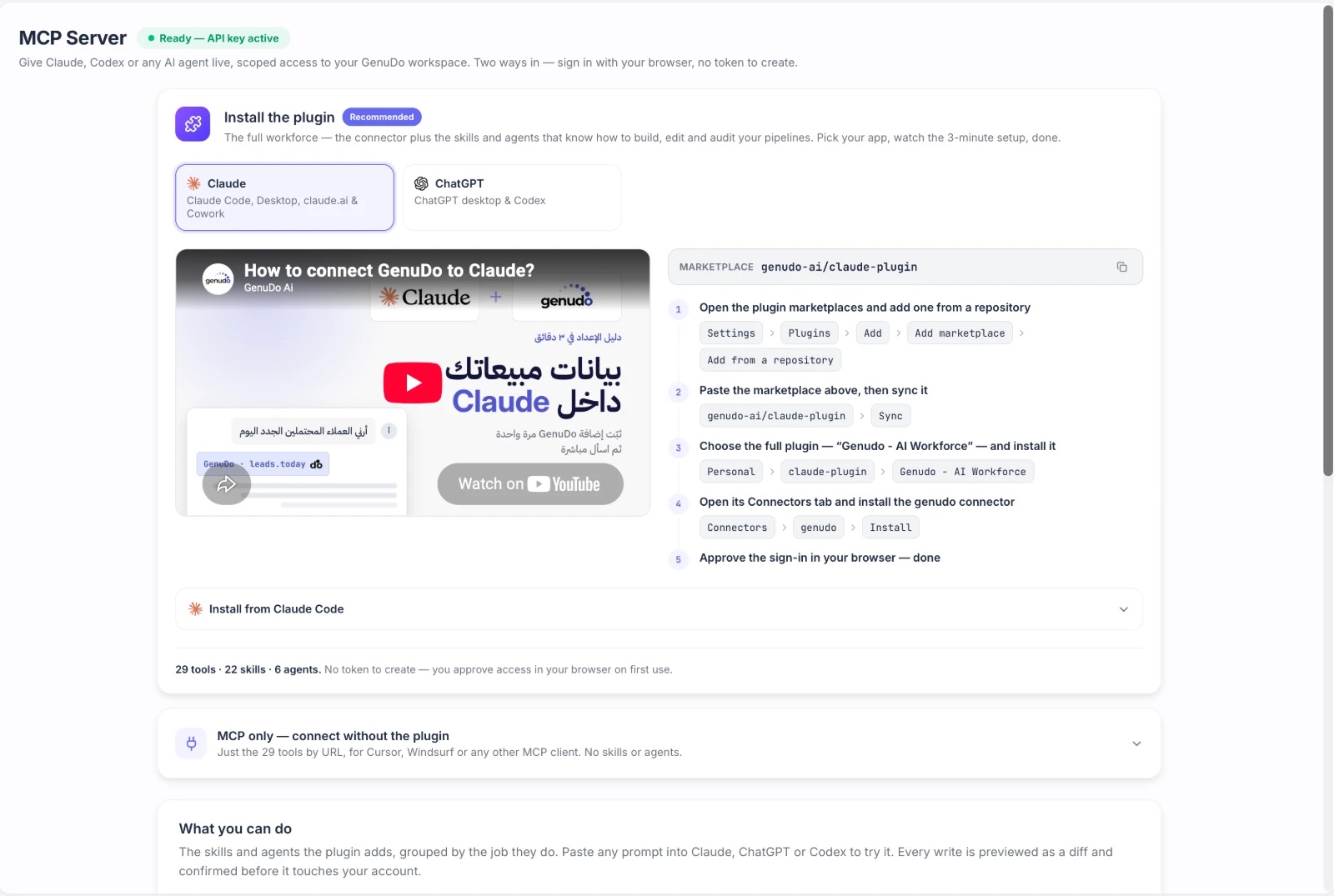
Setup happens from the MCP Server page in the app, which includes an Arabic walkthrough video.
In Claude open Settings > Plugins and add genudo-ai/claude-plugin.
Install Genudo - AI Workforce from the list.
Under Connectors pick genudo and press Install.
Sign in from your browser and start talking. No token to create.
On ChatGPT it is almost the same: open Plugins and add genudo-ai/chatgpt-plugin. The Claude plugin includes 29 tools, 22 skills and 6 agents; the ChatGPT one has 29 tools and 28 skills.
If you use Claude Code, Codex or any other MCP client, point it straight at the MCP server. You get the tools without the ready-made skills and agents.
# MCP server URL
https://api.genudo.ai/mcp

# Claude Code
claude mcp add --transport http genudo \
  https://api.genudo.ai/mcp

# REST API: scoped bearer token
curl https://api.genudo.ai/v1/opportunities \
  -H "Authorization: Bearer $GENUDO_TOKEN"
Token scopes (pick only what you need):
opportunities:readopportunities:writeconversations:writemessages:sendknowledge:readknowledge:writemcp:useA token is shown once when you create it, and only a hashed copy is kept. Choose 30 days, 90 days (the default), 1 year or no expiry, and revoke it whenever you like.
Turn on the plugin and start with one sentence.